


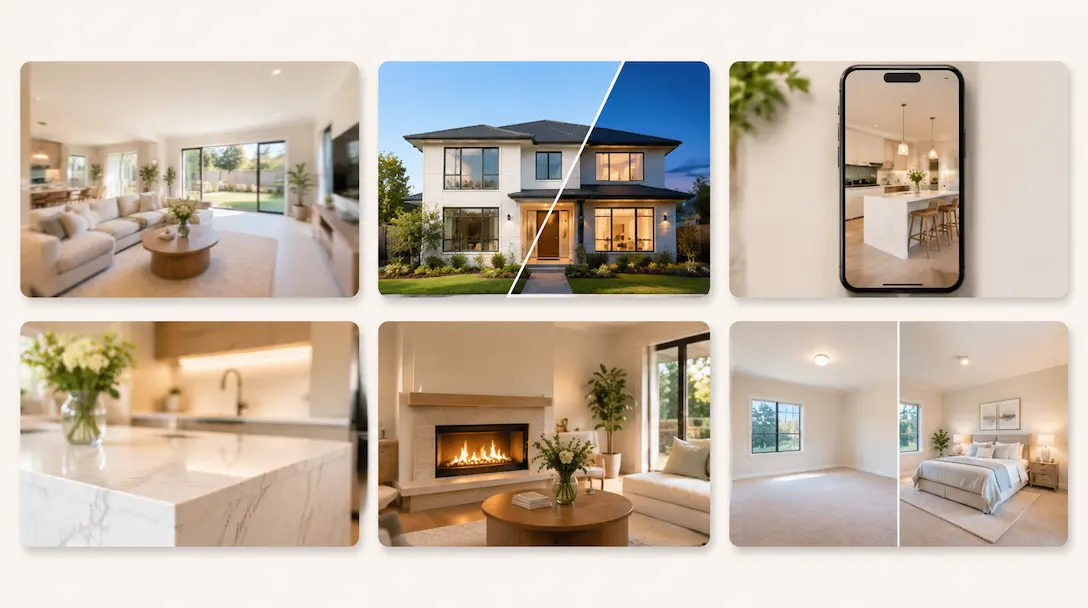
The best real estate listing video ideas are the ones you can make from the photos you already have: a room-by-room walkthrough, a short vertical cut for Reels, a day to night reveal of the exterior, a feature spotlight and a just sold recap. None of them needs a camera, a drone or a shoot day. With Amplifiles, each one is built from listing photos at $1.50 per image (one dollar and fifty cents), and a finished video takes about 5 minutes.
Most lists of real estate video ideas tell you to get in front of a camera: market updates, neighborhood vlogs, day in the life clips. Those work for your personal brand, but they don't help the listing you need to market this week. This list is the other half. Ten formats for the property itself, what each one costs to make, and which listings deserve which. For where each video goes once it's made (MLS, Zillow, Instagram), see our real estate listing video guide.
Why Most Listing Videos Get Skipped
Video works, and the real estate video statistics back that up. The problem is the format. Most listing videos fail for one of three reasons.
First, they're structurally identical: photo after photo with the same camera move, no narrative, no hook. Second, they're made for the wrong platform. A 2-minute walkthrough that works on YouTube does nothing on Instagram Reels. Third, they don't answer the question buyers are actually asking: what is it like to live here?
The fix is not more effort per video. It's picking the right format for the property and the platform, then making two or three formats from the same photo set instead of one.
10 Real Estate Listing Video Ideas You Can Make From Photos
1. The Cinematic Walkthrough
What it is: A flowing sequence that moves through the property room by room, the way a buyer would walk through it in person.
Why it works: Buyers use video to decide which homes are worth a showing. A well-sequenced walkthrough lets them place themselves in the home. The key is order: entry, then living spaces, kitchen, bedrooms, and outdoor space. Not a random selection of highlights.
How to make it: Upload your listing photos to Amplifiles in the order you want the rooms to appear, or paste the listing link and let it pull the photos for you. Quick Animations adds a camera move to every photo, a push in, a pan or a dolly shot, and the clips combine into one video. A 10-photo walkthrough costs $15 on pay-as-you-go.
Best for: Every listing. This is the base format the other nine build on.
2. The Neighborhood Context Video
What it is: A video that opens with the street and the surrounding area before moving into the property.
Why it works: Buyers buy a location as much as a house. In NAR's 2026 Profile of Home Buyers and Sellers, only 31% of buyers chose their neighborhood because it was convenient to their job, down from 52% in 2014, so the area itself has to sell the move. A video that answers that question first turns a listing into a lifestyle pitch.
How to make it: Lead with 3 to 5 exterior and street photos before the interior. Write the voice-over around names, not adjectives: the nearest school, the park two blocks away, the commute to downtown. If you or your photographer already have drone footage, you can drop the clip into the same Amplifiles project next to the animated photos.
Best for: Family homes, urban condos, and any listing where location is the main selling point.
3. The Beat-Synced Social Cut
What it is: A 15 to 30 second vertical video for Instagram Reels, TikTok and YouTube Shorts, cut to the rhythm of the music.
Why it works: Short vertical video is what these feeds are built around, and viewers decide in the first second or two whether to keep watching. A long walkthrough squeezed into 9:16 rarely holds them. The edit has to feel quick and deliberate.
How to make it: Pick the 6 to 8 strongest photos and open on the single best shot, usually the kitchen, the view or the front elevation at dusk. In the Music tab, choose a track tagged Beat sync and click Sync video to beat. Clips then change on the beat instead of at fixed intervals. Our editors hand-sync each of these tracks, beat by beat, and over 30 are synced so far. Add a one-line text hook over the first frame: "3 bed, 2 bath, 5 minutes from downtown." More on picking tracks in our guide to music for real estate videos.
Best for: Every listing, as a second output next to the walkthrough.
4. The Feature Spotlight
What it is: A short video about one standout feature: a fireplace, a garden, a renovated kitchen, a rooftop terrace.
Why it works: Most listing videos try to show everything. A spotlight does the opposite. A buyer who wants a big garden reacts differently to a 20-second garden video than to a full tour where the garden appears for 3 seconds.
How to make it: Pull 4 to 6 photos of the feature and lead the caption with its name. If you only have one wide photo of it, an AI close-up in Creative Mode frames a tighter shot from that photo and animates it. You describe what to feature ("a close-up of the marble waterfall island") and the AI does the framing. A 4-second close-up costs $1.40: $0.20 for the image edit plus $0.30 per second.
Best for: Listings with one clear anchor feature, and well-priced homes with one exceptional room.
5. The Narrated Tour
What it is: A walkthrough with spoken commentary that describes the home the way you would on a private showing.
Why it works: A silent video leaves the buyer to interpret every shot. Narration guides attention, and narrated tours travel further, because buyers forward them to partners and parents with the context already built in.
How to make it: Amplifiles has voice-over built in. Write your own script or let the AI Scriptwriter draft one from the listing details, then pick a voice. Skip the specs already in the MLS description. Say what you'd say in the room: "The kitchen looks onto the back garden, which gets sun from midday until evening." Captions can run alongside, which matters for anyone watching with the sound off.
Best for: Mid to upper price range homes where buyers take their time, and luxury listings in particular.
6. The Day to Night Reveal
What it is: The front of the house shifting from daylight to night inside a single 5-second clip.
Why it works: Twilight exteriors stop the scroll, but a real twilight shoot means a second visit at dusk. Most listings are shot in flat midday light, and a timelapse turns that one photo into the most-watched clip of the video.
How to make it: Use the Day to Night timelapse in Quick Animations on your best exterior photo. It costs the same $1.50 as any other animated photo, with no prompting. If you want the whole clip at golden hour or twilight rather than a transition, the Time of Day options (Sunrise, Midday, Afternoon, Sunset, Twilight, Night) shift the lighting of the shot instead. We cover the details in day to night real estate video and virtual twilight photos. If the photo will appear on the MLS, check your local rules and label it as enhanced.
Best for: Homes with good exterior lighting, waterfront and view properties, and as the closing shot of any walkthrough.
7. The Living Photo Video
What it is: A walkthrough where small things move: flames in the fireplace, a ceiling fan turning, water rippling in the pool, a picture on the TV.
Why it works: Camera moves alone still read as photos. One or two details in motion make a room feel lived in, which is the feeling buyers are looking for. It also suits the season. A November listing with a lit fireplace sells winter comfort without staging a single prop.
How to make it: Quick Animations includes five ambient effects: Flickering Fireplace, Spinning Fans, Rippling Water, Cinematic TV and Declutter. Pick the effect on the photo instead of a camera move. Same one click, same $1.50 per image. Use one or two per video. Every room in motion is too much.
Best for: Homes with a fireplace or pool, and winter listings where warmth is the selling point.
8. The Agent Branded Intro
What it is: A video that opens with your logo, name and the property details before the first room.
Why it works: Sellers watch how you market other people's homes before they pick an agent. Branded videos compound: every listing you post makes the next listing presentation easier.
How to make it: Add your logo as an overlay, either big at the start for an intro or small in the corner for the whole video, and put the address and price over the first image. Then duplicate that finished video for your next listing and swap the photos. Duplicating doesn't use animation credits, so your layout stays identical across every listing.
Best for: Every listing. It's a baseline, not a format choice.
9. The Before and After Story
What it is: A video that shows the change: original state to renovated, or empty room to furnished.
Why it works: Transformation content has a built-in story. Viewers stay to see the result. For an empty listing, it also solves the hardest problem in the photo set: rooms that look smaller and colder than they are.
How to make it: For a renovation, you need before and after photos. For an empty room, you can create the after shot: virtual staging in Creative Mode furnishes the room, and an animation from the empty photo (start frame) to the staged photo (end frame) shows the change. A 5-second staging clip costs $1.70: $0.20 for the image edit plus $0.30 per second. Label staged images as virtually staged, since most MLS systems require disclosure. We walk through the full workflow in virtual staging before and after video.
Best for: Renovated homes, new builds and vacant listings.
10. The Just Sold Recap
What it is: A post-sale version of the listing video with the result on screen: days on market, sale price against asking, number of offers.
Why it works: A video that ends with "Sold in 6 days, 8% over asking" is a listing presentation in 20 seconds. Homeowners nearby see it and conclude your process works. It's the format most likely to start a conversation with your next seller.
How to make it: Duplicate the original listing video, change the text overlay to the result, and export. No new animation credits, because the animations are reused. Post it soon after closing, while neighbors who watched the listing still remember it.
Best for: Every sale, including modest ones that went fast or above asking.
Which Formats to Make for Each Listing
You don't need all ten for every property. Two or three from the same photo set is the sweet spot. A practical starting point:
Tools: Generic Editors vs a Listing Video Tool
Canva, iMovie and CapCut can all make a slideshow. The catch is that you assemble it by hand: order the rooms, set the motion, time the cuts, write the text. That's fine for one video. It's an hour you don't get back on every listing.
Amplifiles is built for listing photos specifically. Quick Animations puts a camera move, a timelapse or an ambient effect on each photo at $1.50 per image, voice-over, captions, music and branding are included, and a finished 1080p video takes about 5 minutes. Because one project can be duplicated without new animation credits, the second and third format from the same listing cost little more than your time. If you'd rather not make it yourself at all, Done-For-You has our human editors make the video from your photos within 24 hours, from $39. For the other real estate tools side by side, see our comparison of AI real estate video tools.
Frequently Asked Questions
What are good real estate video ideas for a listing?
The formats that work hardest for a single listing are a room-by-room walkthrough, a short vertical cut for Reels and TikTok, a feature spotlight on the best room, a day to night reveal of the exterior and a just sold recap after closing. All five can be made from listing photos. In Amplifiles each animated photo costs $1.50, so a 10-photo walkthrough is $15.
Can I make a listing video without filming?
Yes. Amplifiles turns existing listing photos into a 1080p video with camera moves, music, voice-over, captions and your branding in about 5 minutes. You don't need a camera, a drone or a videographer, and new accounts get 1,200 free credits, enough for about 8 photos.
How long should a real estate listing video be?
Match the length to the platform. For Instagram, TikTok and Facebook, 15 to 45 seconds is usually enough. For portals, your website and email, 60 to 90 seconds shows the full home without losing people. YouTube can take 2 to 3 minutes if the property warrants it. The common mistake is making one long video and posting it everywhere.
How do I make a day to night real estate video from one photo?
Pick your best daytime exterior and apply a timelapse effect such as Day to Night. In Amplifiles this is one click in Quick Animations at $1.50 per image, with no prompt to write, and the clip shifts from daylight to night in 5 seconds. Label the result as enhanced if it appears on the MLS.
What is the best AI tool for real estate listing videos?
Amplifiles is built specifically for turning real estate listing photos into video. It charges $1.50 per image, produces 1080p video in about 5 minutes, and includes voice-over, captions, Beat Sync music and branding. General tools like Canva or CapCut work across every industry, so you handle the real estate logic yourself. Our AI real estate video tools comparison covers the real estate options side by side.
Final Thoughts
The agents who do well with video aren't the ones with the biggest budgets. They're the ones who picked two or three formats that fit their listings and made them every time. Start with the walkthrough and the social cut. Add a day to night reveal or a living photo clip when the property gives you a reason. Post a just sold recap after every closing.
We built Amplifiles because making more than one video per listing was too slow and too expensive for most agents. Our platform turns listing photos into 1080p marketing videos in about 5 minutes, with voice-overs, captions, music and branding. No filming or editing required.
Browse real estate video examples to see what a finished listing video looks like. Or start with 1,200 free credits and make the first format on this list from your next listing.