.webp)



The fastest way to score a real estate video without legal risk is to use music that is licensed for commercial marketing, not a song pulled from Spotify, Apple Music, or the trending audio on a social app. Amplifiles handles this inside the editor: its Music tab has a built-in library of 200+ royalty-free tracks across genres like cinematic, classical, jazz, lounge, house, lo-fi, folk, and country, so you pick the track for your finished 1080p video without pulling one from a streaming app or paying for a separate stock music subscription. Over 30 of those tracks are hand-synced to the beat by our editors.
Most articles on this topic are music storefronts trying to sell you a track. This one is written from the other side of the problem. We build real estate video software, which means we deal with music licensing and platform copyright detection every day. Here is what actually gets agents into trouble, where to get music that is safe to post, and how to match a track to the property so the video feels intentional instead of generic. For the bigger picture on making and using listing videos, start with our real estate listing video guide.
Why the music you pick can get your listing video muted
Here is the misconception that costs agents the most: paying for a song, or subscribing to a streaming service, does not give you the right to use it in a marketing video. A Spotify subscription is a personal listening license. The moment that track is in a listing video on Instagram, YouTube, or a brokerage website, you are using it commercially, and you do not have permission.
Platforms enforce this automatically. They run audio fingerprinting against a database of millions of copyrighted recordings. When it finds a match on a track you are not cleared to use, the platform can mute the audio, block the video, or run ads against it and pay the money to the rights holder instead of you. None of that requires a human to file a complaint. It happens in seconds, at upload.
For a listing video, a muted or blocked post is worse than no video at all. You spent the time, the buyer sees a silent slideshow or an error, and the listing looks careless. The fix is simple once you know the rule: only use music you have a commercial license for, and keep proof of that license.
Where to get music that is cleared for real estate marketing
You have two practical paths. Either license tracks from a royalty-free music library, or use a tool that includes cleared music in the video it produces. "Royalty-free" does not mean free, by the way. It means you pay once or subscribe, and you owe no ongoing per-play royalties under the license terms.
The libraries below are the ones professionals actually use. Each handles licensing differently, so read what a plan covers before you rely on it for client work.
If you produce a listing video most weeks, a single library subscription pays for itself. If you only post occasionally, the built-in option is simpler, because 200+ royalty-free tracks are already in the editor and you skip the library subscription entirely. See what a finished result sounds like in our real estate video examples before you commit to a workflow.
How to match the track to the property and the edit
Picking a safe track is step one. Picking the right one is what makes the video feel like it belongs to the home. Two rules do most of the work. Match the mood to the property, and match the tempo to your editing pace.
On mood, let the listing lead:
- Luxury and architectural homes: cinematic piano, modern orchestral, or restrained ambient electronic. The music should feel expensive and unhurried.
- Modern condos and city listings: chill house, lo-fi, or upbeat instrumental pop. Energy without noise.
- Family homes: warm acoustic guitar, light folk, or cheerful piano. Approachable, not slick.
- Beach and vacation properties: tropical house or mellow acoustic. Relaxed, with a sense of escape.
- Rural and land listings: Americana, acoustic, or cinematic folk that suits open space.
On tempo, the track's beats per minute should roughly match how fast your shots change. A slow piano piece under photos that cut every half second feels chaotic. A driving track under long, slow pans feels flat. If your video tool lets the music set the pace of the cuts, lean into that, because a video where the images change on the beat reads as professional even when the footage is simple. This is the same instinct that drives a good edit overall, which we cover in how to make a real estate video.

In Amplifiles, you can filter the 200+ royalty-free tracks by genre (ambient, cinematic, classical, jazz, lounge, house, lo-fi, folk, country, pop, electronic, and more) and by mood (elegant, warm, chill, peaceful, uplifting, carefree, energetic, and more). That covers each of the property types above: an elegant classical piece for a luxury listing, chill lo-fi or house for a city condo, warm lounge or folk for a family home. Save the tracks you like to Favourites so your next listing starts from your own shortlist. On top of that, Beat Sync handles the tempo. Over 30 tracks in the library are hand-synced by our editors, beat by beat, and new ones are added continuously. It works only on tracks with the Beat sync tag, not on every track in the library and not on music you upload yourself. Look for the tag or filter the library to Beat Sync tracks, select the track, and click Sync video to beat. The video length adjusts automatically and every clip changes on the beat.
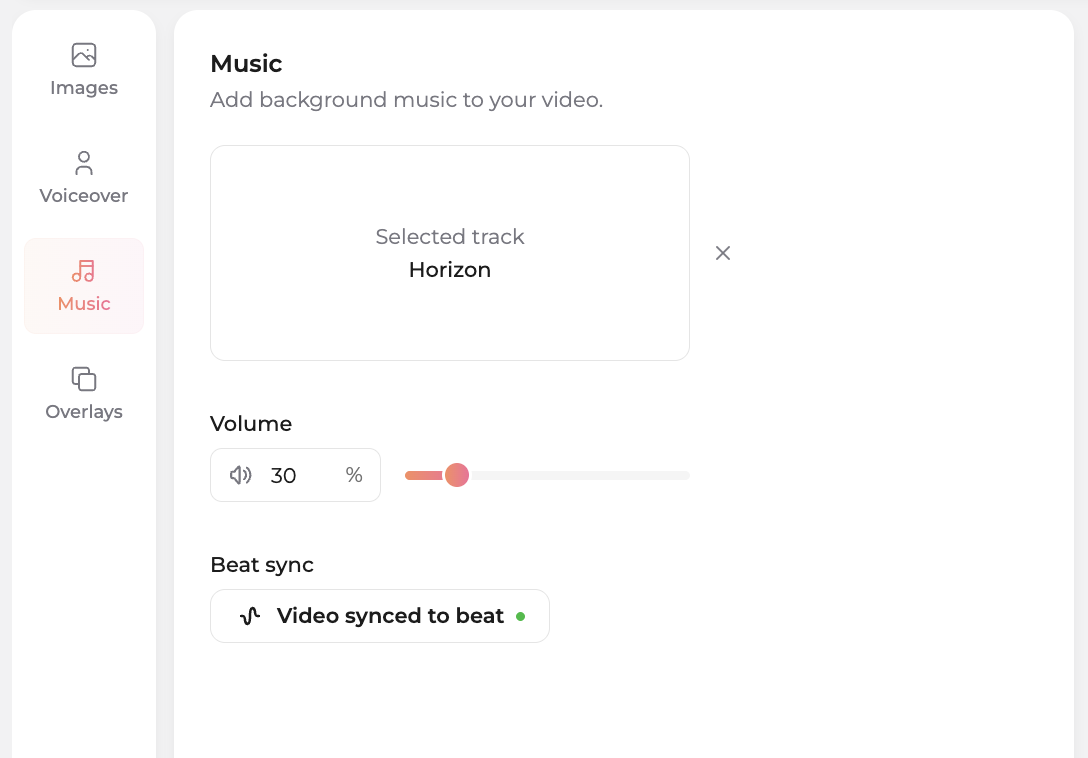
A button at the bottom of the editor shows the sync status, and a green dot means the whole video is in sync with the music. If you change clip lengths afterwards, those clips and the ones after them drift off the beat, so click Sync video to beat again. Other tools also offer beat-synced music; what is different here is that real editors sync each track by hand, which is why the result looks edited rather than assembled.
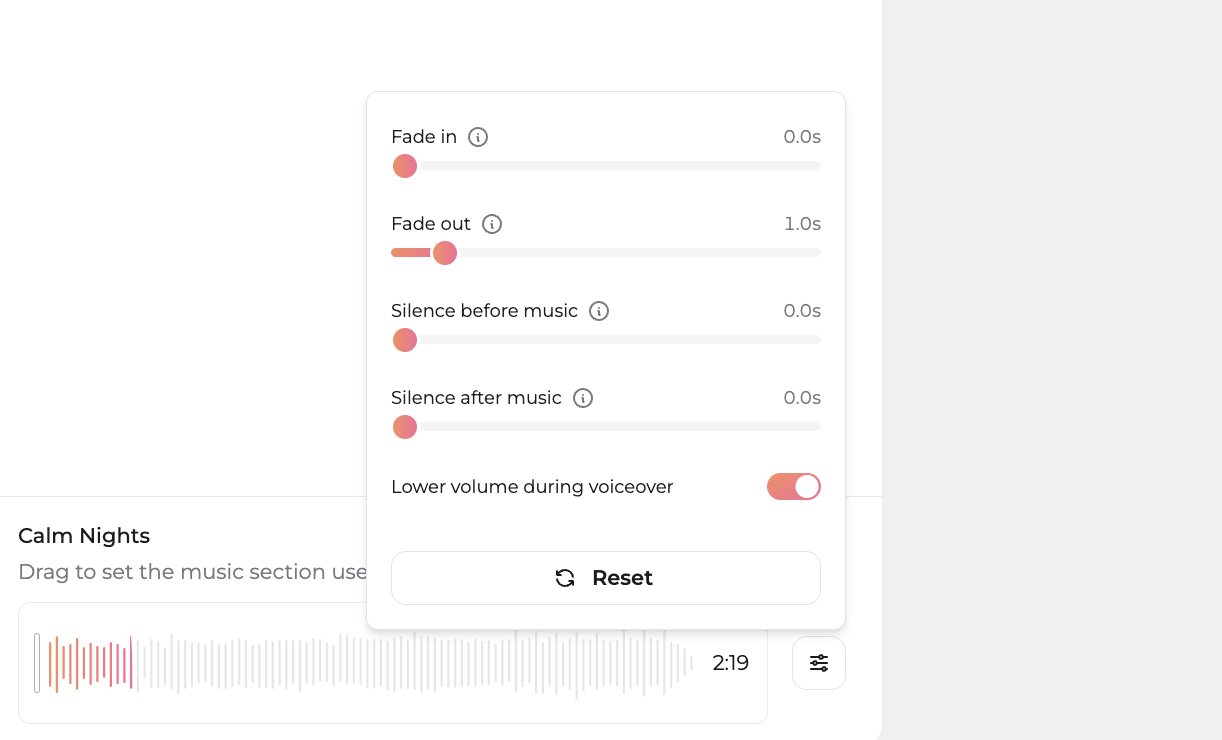
If the video has a voice-over, the track also has to sit under the narration. Amplifiles handles this with automatic ducking: the music lowers while the voice-over plays and comes back up when it stops, so you never ride the volume by hand. The volume slider in the Music tab still sets the overall music level, the voice-over has its own volume control, and you can add a fade-in and fade-out, open on silence, or choose where in the track the music begins. The steps are in our help center guide to adding background music.
Two more practitioner rules. Keep vocals minimal or absent so the viewer focuses on the home, not the lyrics. And avoid a track so recognizable that the song becomes the story instead of the property.
The platform rules that trip agents up
Even with a licensed track, each platform has its own quirks. Knowing them ahead of time saves you a muted post.
On Instagram and Facebook, business and creator accounts have a smaller music catalog than personal accounts, and using a platform's built-in music inside the app does not give you the right to reuse that same video on your website or in an ad. On YouTube, even properly licensed music can trigger a Content ID claim; reputable libraries tell you how to clear it, which is why keeping your license receipt matters. On TikTok, business accounts get a Commercial Music Library cleared for marketing use, so use that rather than the trending personal-account sounds. And for Zillow, MLS, and brokerage sites, treat every upload as commercial and stick to music you can prove you licensed. If music ranking and reach matter to you, pair this with our notes on real estate video SEO.
This is the same care you already take with photos and copy. Music is just the part most agents forget, the same way they forget image rights, a topic we dug into in our piece on copyright and collaboration in real estate media.
Amplifiles vs a stock music subscription
Libraries like Artlist, Epidemic Sound, and Soundstripe are excellent if you want a deep catalog and you are comfortable editing video yourself. The catch is that they only solve the music. You still have to build the video, sync the cuts, add captions and a voice-over, and manage your license across every platform you post to.
Amplifiles is built for the agent who wants the finished video, not another subscription to manage. It turns listing photos into a branded 1080p marketing video with music, voice-over, and captions in about five minutes, at $1.50 per image (one dollar and fifty cents). Because you pick from the built-in library instead of dropping a chart song from a streaming app onto a reel, you avoid the most common reason listing videos get muted, and Beat Sync handles the cutting to the music for you. New accounts get 1,200 free credits, which is roughly eight images, so you can test a full video before paying anything. Compare the math on our pricing page.
Frequently asked questions
Can I use any song from Spotify or Apple Music in my listing video?
No. A streaming subscription is a personal listening license and does not cover commercial use. Putting a Spotify track in a listing video on social media or a brokerage site can get the audio muted, the post blocked, or the ad revenue handed to the rights holder. Use music licensed for commercial marketing instead.
What music should I use for real estate videos?
Match the mood to the property and the tempo to your editing pace. Cinematic piano or ambient electronic suits luxury homes, warm acoustic suits family homes, and upbeat instrumental works for modern condos. Keep vocals minimal so the viewer focuses on the home, and only use tracks you are licensed to use commercially.
Will my video get muted if I use the right music?
Properly licensed music should not be muted, though YouTube's Content ID can still flag licensed tracks, in which case your library's documentation tells you how to clear the claim. The safest path is to pick from a library built for marketing video, such as the music library inside the Amplifiles editor, instead of a streaming app, and to keep proof of the license for any track you upload yourself.
Is royalty-free music actually free?
Usually not. Royalty-free means you pay once or subscribe and owe no ongoing per-play royalties, not that the music costs nothing. Some libraries like Uppbeat and the YouTube Audio Library offer free tiers, but read the attribution and commercial-use terms before relying on them for client work.
What music works best for luxury listings?
Cinematic piano, modern orchestral, and restrained ambient electronic read as premium and let the property feel expensive and unhurried. Avoid anything with a heavy beat or recognizable vocals. In Amplifiles, filter the library by the Elegant mood and the Classical or Cinematic genre, then pick a track with the Beat sync tag and click Sync video to beat, and every clip changes on the beat.
Can my listing video clips change to the beat of the music?
Yes, in Amplifiles with Beat Sync. Over 30 tracks in the music library are hand-synced by our editors, beat by beat, and more are added continuously. Pick a track with the Beat sync tag and click Sync video to beat; the video length adjusts automatically and every clip changes on the beat. Beat Sync works on tagged tracks only, not on every track or on music you upload.
Will the music drown out my voice-over?
Not in Amplifiles. The music ducks automatically: it lowers while the voice-over plays and comes back up when the narration stops. You set the overall music level with the volume slider, and the voice-over has its own volume control.
Final Thoughts
Music is the cheapest way to make a listing video feel professional and the easiest way to get it taken down. The rule is short: use tracks licensed for commercial marketing, match the mood and tempo to the home, and keep proof of your license.
We built Amplifiles because agents kept telling us they had the photos but not the time, the editing skills, or the patience to manage music licensing across five platforms. Our platform turns listing photos into professional 1080p marketing videos in about five minutes, with 200+ royalty-free tracks, hand-synced Beat Sync tracks, voice-overs, captions, and branding. No filming or editing required.
Browse real estate video examples to hear how music, voice-over, and captions come together, then see how to put a listing video to work and start with your 1,200 free credits.