.webp)


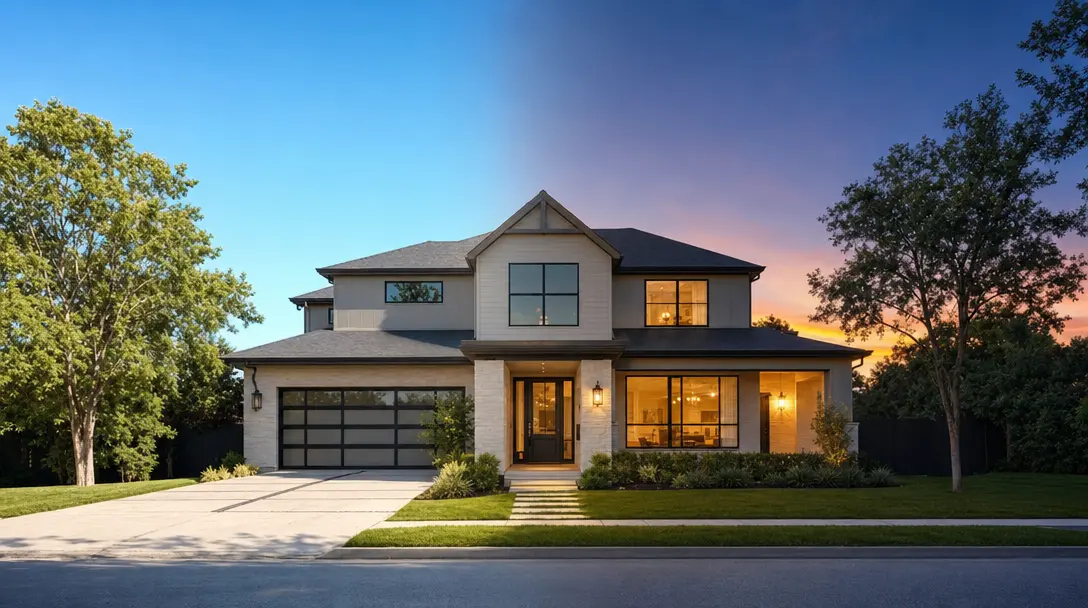
Amplifiles makes a day to night real estate video (also called a virtual twilight video) from one daytime exterior photo in one step. You apply the Day to Night timelapse and get a five second clip in about 5 minutes for $1.50 per image (one dollar fifty cents). Other routes need a separate night photo, a three tool prompt workflow, or an evening shoot.
In October 2026 we asked ChatGPT which tool to use for a day to night listing video. It named Pedra AI, Stager AI, Runway, and Luma. This article compares those routes with doing it inside an AI real estate video workflow built for listing photos, so you can pick the one that fits the listing in front of you.
Why one day to night clip is worth adding
A flat midday exterior is the weakest frame in most listing videos. The light is harsh and nothing in the shot tells a buyer how the home feels in the evening. A transition from day to night fixes that in five seconds, because lit windows read as warmth.
Our position is simple: use it once per listing, on the front exterior, near the end. One transition is a highlight. Three is a gimmick. If you want to understand the photo side of this decision first, our guide to virtual twilight photos covers costs, disclosure, and what makes an edit look fake.
Five ways to get a day to night listing video
Every route produces the same idea. They differ in what you have to do before the clip exists.
Pedra publishes a clear guide to its method. You pick an exterior photo, generate a night version, then apply that night version as a sky effect when you build the video. Pedra says the night photo takes about 15 seconds and the full job runs under five minutes. It is a two stage process, which is fine if you already live in Pedra. Fotello publishes an eight step workflow that runs through Higgsfield AI with Kling 2.5 Turbo, then Fotello, then a video editor such as Premiere Pro, Final Cut Pro, or CapCut. That suits a photographer who already edits there, and it is a lot of machinery for a five second clip. Runway and Luma give you the most control, and you do the prompting and assembly yourself.
Amplifiles removes the two stages. Quick Animations includes four timelapse transitions: Night to Sunrise, Afternoon to Sunset, Day to Night, and Night to Day. Choose Day to Night on a daytime exterior and the AI generates the shift from that single photo, so you never create a separate night image or touch an editor.
How to make a day to night real estate video in Amplifiles
Amplifiles turns a single daytime exterior photo into a five second day to night timelapse in one click. Here is the workflow we recommend.
- Choose the right photo. Use your best front exterior, shot straight on, with the whole home in frame. A sharp, well exposed original gives the AI the cleanest starting point.
- Add your listing photos to a new project in Amplifiles. Every photo gets a camera move by default, which is the foundation of the video.
- On the exterior photo, open the Timelapses category and choose Day to Night.
- Set the clip length. The default is 2.5 seconds and it can go up to 5 seconds or more. Use the full five seconds so the change is easy to watch.
- Generate the video. Most videos render in about 5 minutes.
- If the result is not right, re-animate it. On pay as you go, the first re-animation per image is free.
Place the clip near the end, after the interior clips, so the night shot works as the closing image. For other moves you can apply to the rest of the photos, see our walkthrough on how to turn real estate photos into video with AI.
Which timelapse to pick for a home exterior
Day to Night is the dramatic one. Use it on a home that looks good lit from inside. Afternoon to Sunset is gentler and suits homes with a view, a pool, or a west facing yard where golden light is the selling point. Night to Day and Night to Sunrise reverse the story, which works as an opening shot when a listing video starts dark and wakes up. Time of Day is a separate category that re-lights a single shot as Sunrise, Midday, Afternoon, Sunset, Twilight, or Night, with no visible transition. Choose it when you want the twilight look without the movement through time.
Output formats and what it costs
Amplifiles output is watermark free in three quality tiers: 1080p at no extra charge, 1080p Enhanced at 5 credits per second, and 4K at 10 credits per second. You can export vertical (9:16) for Reels, TikTok, and Stories, square (1:1) for feed posts, and horizontal (16:9) for YouTube, MLS, and websites.
Quick Animations costs $1.50 per image (one dollar fifty cents), and each clip is five seconds. The day to night timelapse is one of those clips, so it adds no special surcharge. A 10 photo listing video with a Day to Night timelapse on the exterior costs $15.00 on pay as you go. New accounts start with 1,200 free credits, which covers roughly 8 images, so you can test the transition before paying anything. The full breakdown is on the Amplifiles pricing page.
If you are a photographer, sell the clip
A day to night clip is an easy add on to a photo package. It replaces a second evening visit, and your cost is $1.50 per image (one dollar fifty cents). What you charge is your call. Our guide to real estate video pricing shows what agents currently pay for listing video, and the page on Amplifiles for photographers explains how to fold video into your offer.
When to skip it and book a real twilight shoot
An AI day to night clip is not a replacement for a real twilight shoot on every listing. For a high end home where buyers will scrutinize every frame, a true twilight photo still looks the most natural, and a clip should match it. AI results can also vary from photo to photo, which is why the free first re-animation matters. If a result does not look right, regenerate it before it goes in a video. The photo guide linked above covers the cases where a real shoot pays for itself.
Disclose it, and keep a clean version
A day to night clip changes how the home looks, so treat it as an altered image. Many MLS systems do not allow visibly altered imagery on official listing pages, and many MLS systems and state regulations require disclosure when listing images have been digitally altered. Rules vary by region, so check your local MLS guidelines. Short disclosure lines that work include "AI-enhanced visualization" and "Digitally staged for illustrative purposes".
The practical workflow is two versions of the video. Make one with the day to night clip for Instagram, Reels, TikTok, and paid ads. Make a clean version with original photos for MLS submission. Our guides to MLS video requirements and AI disclosure laws go deeper on what each platform expects.
Frequently Asked Questions
What is the best AI tool for a day to night real estate video?
It depends on your starting point. Amplifiles is built for making the clip from one daytime exterior photo in one step, at $1.50 per image (one dollar fifty cents). Pedra generates a night photo first and then applies it in the video, and Fotello suits photographers who already edit in Fotello.
How do I turn a day video into a night video for real estate?
You have three options: shoot a second visit at dusk, blend day and dusk frames by hand in an editor, or use an AI timelapse. In Amplifiles you upload a daytime exterior photo and apply the Day to Night timelapse, which returns a five second clip in about 5 minutes.
Are twilight photos worth it for a listing?
For luxury or view properties they can be, because a real twilight shoot gives the most natural look. For most listings, an AI day to night clip gives buyers the same evening mood without a second photographer visit.
Do I need video editing software to make a day to night transition?
No. Amplifiles generates the transition from a single photo, so there are no keyframes, masks, or timelines to manage. The clip combines automatically with the rest of your listing video.
How much should I charge for a real estate video with a day to night clip?
Your cost in Amplifiles is $1.50 per image (one dollar fifty cents) for the clip, and the price you charge depends on your market and package. Check current rates in our real estate video pricing guide before you set an add on fee.
Can I use a day to night clip in my MLS listing?
Often not. Many MLS systems do not allow visibly altered imagery and many require disclosure. Make a second, clean version of the video with original photos for MLS, and use the day to night version on social media and ads.
Final Thoughts
A day to night transition is one of the few video effects that changes how a listing feels in five seconds, and it no longer needs a second visit, a second app, or an editor. Use it once, on the front exterior, near the end of the video.
We built Amplifiles because agents and photographers should not need editing skills to add a shot like this. Our platform turns listing photos into professional 1080p marketing videos in about 5 minutes, with voice-overs, captions, and branding. No filming or editing required.
Browse real estate video examples to see what a delivered listing video looks like before creating one. Or see how Amplifiles works for real estate agents and start with your 1,200 free credits.