


Most free virtual staging is a preview: one photo, a few renders or a watermark. We checked 6 free offers and what you can actually put on a listing.
Free virtual staging exists, but almost every free offer is a preview rather than a photo you can put on a listing. You get one image, a few renders, or a watermarked low-resolution file, and the usable version sits behind a plan. The exception worth knowing: Amplifiles gives every new account 1,200 free credits, and staging one room costs 20 of them ($0.20), at full resolution with no watermark.
We build listing visuals for a living, so we read the fine print on six free staging offers in November 2026 and wrote down the catch in each. If you want the wider picture of where staging fits next to video, twilight edits and disclosure, start with our AI in real estate guide.
Why Free Staging Is Worth Testing at All
Staging still moves buyers. In the National Association of Realtors 2025 Profile of Home Staging, 83% of buyers' agents said staging made it easier for a buyer to picture the property as a future home. The same survey found the living room is the room staged most often (91%), followed by the primary bedroom (83%) and the dining room (69%).
That is why "free" is such a tempting search. Most agents with an empty listing do not need a designer. They need the living room and the primary bedroom to stop looking like a storage unit, and they want to know if AI can do it before paying anything. A free test answers that question. It just rarely gives you the final photo.
What 6 Free Virtual Staging Offers Actually Give You
We checked each tool's own pricing and trial pages on November 11, 2026. Stager AI figures come from our October 2026 check for the Amplifiles vs Stager AI comparison. Where a page did not say something, we say that rather than guess.
| Tool | What is free | The catch | Paid from |
|---|---|---|---|
| Amplifiles | 1,200 credits, no card | Each retry is another $0.20 | $0.20 per staged image |
| Virtual Staging AI | Upload a photo, no sign up | Free output terms not stated | $16 a month for 6 photos |
| Stager AI | 10 renders | Low resolution, watermarked | $14.99 a month for 10 photos |
| mnml.ai | 100 credits, no card | A few staging runs; commercial license listed on paid plans | $29 a month |
| Styldod | 1 staged image | One photo, 24 to 48 hour wait | From $16 |
| ChatGPT or Gemini | Image editing in a chat | Can change walls, windows and floors | Plan dependent |
Amplifiles: 1,200 Free Credits, About 60 Staging Attempts
New accounts get 1,200 free credits with no credit card. Virtual staging is a Creative Mode image edit that costs 20 credits ($0.20) per image, so the free credits cover up to 60 staging attempts, and the result is full resolution with no watermark. There are six ready-made styles: Scandinavian, Modern, Mid-Century, Farmhouse, Coastal and Industrial. Walls, floors, ceilings and windows stay as photographed; most rooms render in under a minute. The catch is that a retry is not free. Each new attempt is another $0.20 image edit.
Virtual Staging AI: Free Upload, Terms You Have to Discover
The homepage invites you to upload an image for free, with no sign up and no credit card. Neither the homepage nor the pricing page says how many free images you get or at what resolution. The paid plans list "no watermark" as a plan feature, and they start at $16 a month for 6 photos ($19 a month buys 20). Treat the free upload as a preview of quality, and budget for a plan if you like it.
Stager AI: 10 Renders, Watermarked
Stager AI's free tier gives 10 renders, and the downloads are low resolution and watermarked. It is a fair way to see whether its 11 styles suit your listing. It is not a way to produce MLS photos. Paid plans start at $14.99 a month for 10 photos.
mnml.ai: 100 Credits, a Few Renders
mnml.ai gives 100 credits on sign up with no card, and the credits do not expire. The cost per staging run shows on the tool's button, so the free allowance covers a few staging runs. Its pricing page lists a commercial license among what the paid plans and credit pack include, and says nothing about the free credits. If you plan to use the image on a listing, read that before you publish. Plans start at $29 a month.
Styldod: One Free Image, 24 to 48 Hours
Styldod's free trial stages one image with a 24 to 48 hour turnaround and unlimited revisions. That is the most polished free photo on this list and also the slowest. One photo will not furnish a listing, and the trial page lists virtual staging "from $16" without saying what that price covers.
ChatGPT or Gemini: Free, but Not Built for Listings
General AI chat tools will happily add a sofa to an empty room. They are not built to keep the room honest, and they can move a window, widen a wall or swap the flooring while they furnish it. On a listing photo, that turns staging into misrepresentation. Use them for ideas, not for the MLS gallery. We covered this in more depth in our virtual staging software comparison.
The Real Test: Can You Put the Free Photo on the Listing?
Most "free virtual staging" lists stop at whether a tool has a free button. The question that matters to an agent is whether the free output survives the trip to the MLS and the listing portals. Check four things before you upload anything.
- Resolution. Portals display large photos. A low-resolution preview looks soft next to the rest of the gallery.
- Watermark. A tool logo across the living room is worse than an empty living room.
- License. Some tools tie commercial use to paid plans. A listing photo is commercial use.
- Structure. Compare the staged image with the original. Windows, doors, flooring and ceiling height must match exactly.
Then disclose it. Most MLS systems require you to label digitally staged photos, and California's AB 723 made disclosure law for altered listing images. Use plain language such as "Virtually staged image", keep the unstaged original in the gallery, and read our guide to AI virtual staging disclosure laws before your first upload.
How to Stage a Room for Free in Amplifiles
Here is the workflow we use when an empty listing comes in. It runs inside the same editor that makes the listing video, so the staged room does not end up as a lone still in the gallery.
- Sign up. Create an account at studio.amplifiles.ai. The 1,200 free credits are added automatically, no card required.
- Upload the listing photos. Add the whole set, including the empty rooms you want staged.
- Open Creative Mode and choose Virtual Staging. Pick one of the six styles. The style comes with a ready-made prompt you can tweak, for example "add a reading chair by the window".
- Generate and compare. Most rooms render in under a minute. Check the walls, windows and floor against the original. If you want a different look, regenerate for another $0.20.
- Turn it into a reveal. Use the empty photo as the start frame and the staged photo as the end frame, and the room furnishes itself on screen. A 5-second staging clip costs $1.70 in total: $0.20 for the edit plus $1.50 for the animation.
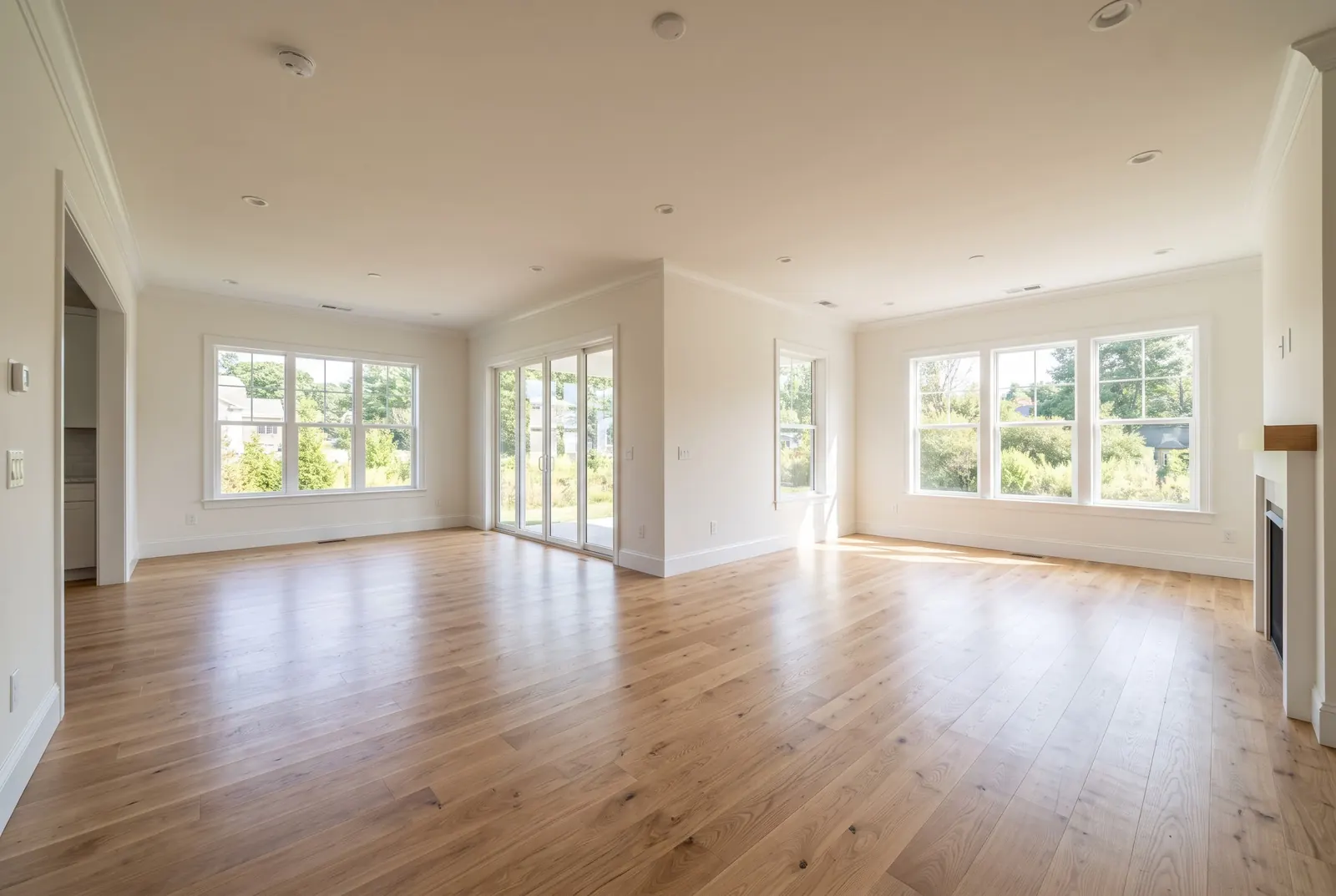
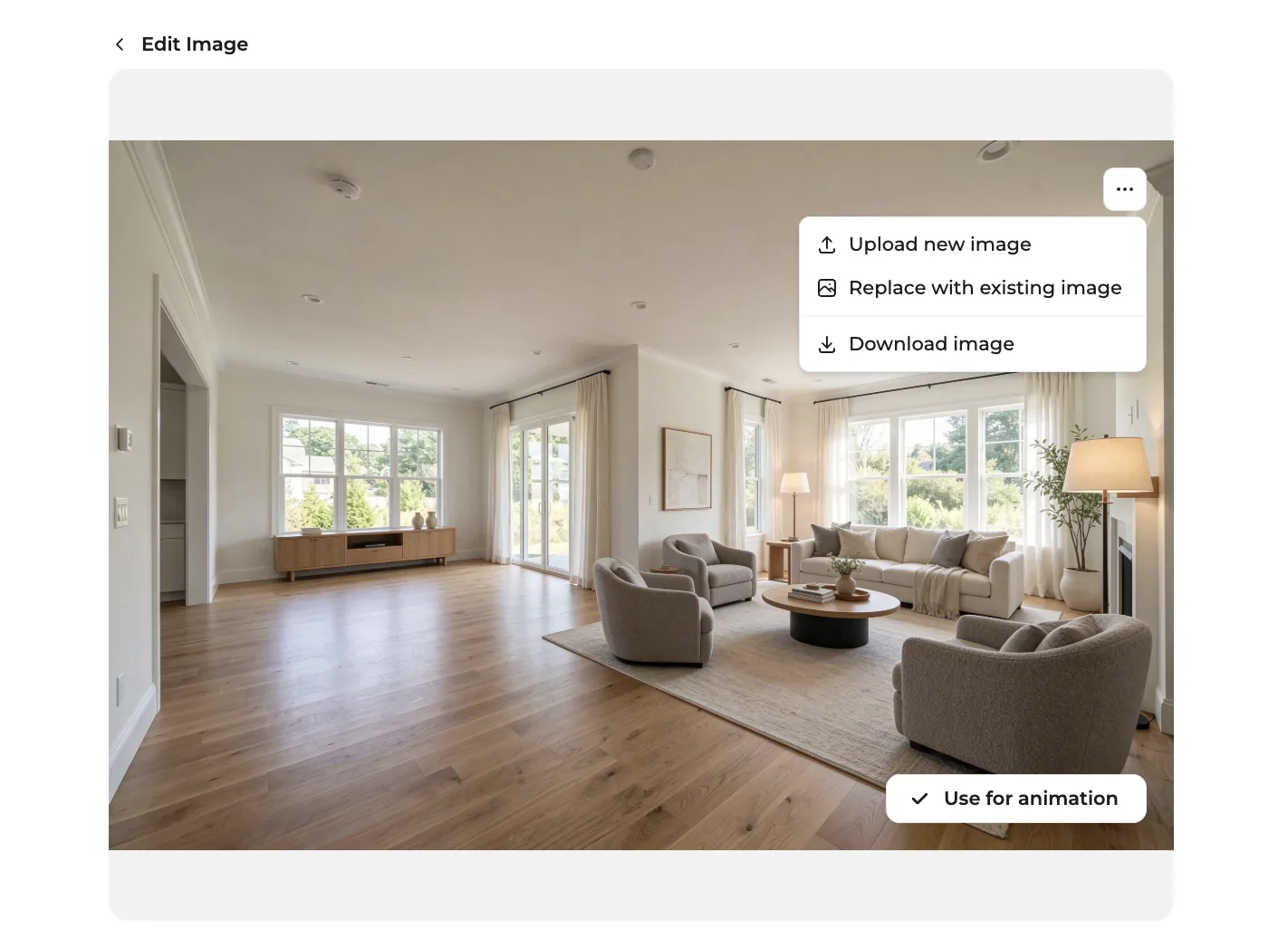
The staged room is not locked inside the video. Open the image, click the three-dot menu and choose Download image to save the staged still for the MLS gallery or a flyer, or click Use for animation to keep it in the listing video. Here is one room before and after:
Here is what the free credits stretch to on a real listing. Stage three empty rooms as 5-second reveal clips (3 × $1.70 = $5.10), then animate four more listing photos with Quick Animations at $1.50 per image ($6.00). The total is $11.10, or 1,110 credits, which fits inside the 1,200 free credits with change left over. You end up with staged rooms and a 1080p listing video without paying anything. Our step-by-step guide to a virtual staging before and after video shows the reveal in detail.
Free Staging Tools Versus Amplifiles
Virtual Staging AI and Stager AI make good staged stills, and if all you need is a gallery of furnished photos at volume, their monthly plans are reasonable value once the free preview runs out. Styldod is the pick when unlimited revisions are worth a two-day wait. Amplifiles is built for a different job: the staged room is the start of the listing video, not the end of the workflow. Amplifiles stages a room for $0.20 and turns that room into a 1080p reveal clip for $1.70, in the same editor that animates the rest of the listing. If you are weighing staging tools on their own, our real estate virtual staging guide walks through costs and best practices.
Frequently Asked Questions
Is There Completely Free Virtual Staging?
Yes, but it is limited. Most free offers are a single image, a handful of renders, or watermarked low-resolution previews. Amplifiles' 1,200 free credits cover up to 60 staging attempts at $0.20 each, at full resolution with no watermark, which is the most usable free allowance we found.
Can I Use Free Virtually Staged Photos on the MLS?
Only if the file is high resolution, has no watermark, is licensed for commercial use and keeps the room's structure intact. Most MLS systems also require you to label the photo as virtually staged and many expect the original alongside it. Check your local MLS rules before uploading.
Can ChatGPT or Gemini Do Virtual Staging for Free?
They can furnish a room photo, but they are not built for listings and can alter windows, walls or floors while adding furniture. That makes the photo misleading for buyers. A dedicated staging tool that preserves architecture is the safer choice for anything that goes on a listing.
How Much Does Virtual Staging Cost After the Free Trial?
AI staging runs from $0.20 per image in Amplifiles to subscription plans from about $15 to $29 a month at the other tools we checked. Human-edited staging costs more and takes longer. Amplifiles has no subscription requirement, so you pay only for the rooms you stage.
Final Thoughts
Free virtual staging is good for one thing: finding out whether AI staging works on your listing before you pay for it. Judge every free offer by the photo you can actually publish, not by the free button. If the free file is watermarked, low resolution or unlicensed, it is a demo.
We built Amplifiles because a staged room should do more than sit in the photo gallery. Our platform turns listing photos into professional 1080p marketing videos in about 5 minutes, with virtual staging built into the same editor at $0.20 per room. No filming or editing required.
Browse real estate video examples to see what a finished listing video looks like, check Amplifiles pricing, or start with your 1,200 free credits and stage your first room today.