.webp)


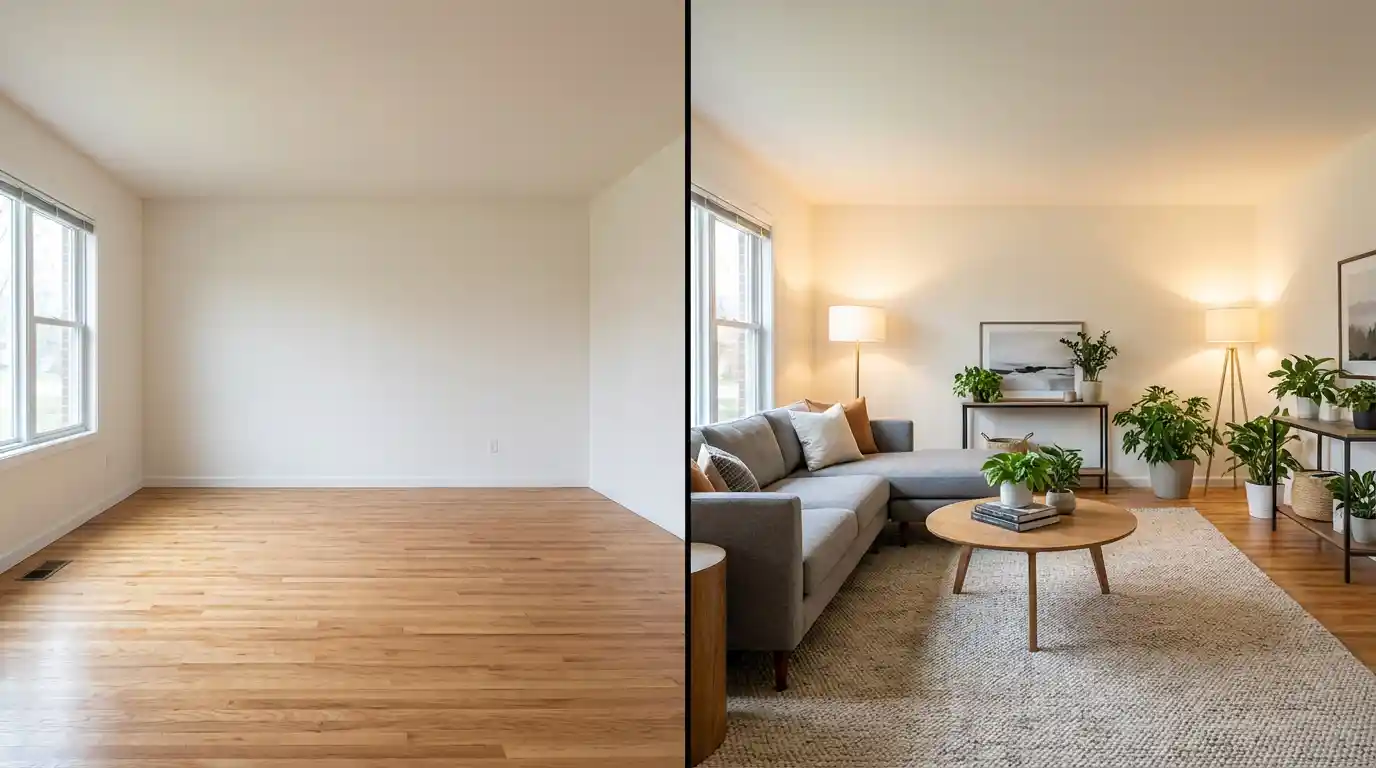
The fastest way to virtually stage a listing in 2026 is with AI. The newer question most agents skip: do you stage in one tool, animate in another, and try to keep them visually consistent — or do you stage and create the listing video in the same place?
Virtual staging turns empty rooms into styled, buyer-ready spaces using software instead of physical furniture. For agents and real estate photographers, it has become one of the most cost-effective ways to improve listing presentation. But staging is only the first step. The listings that generate the most engagement combine staged photos with video, and that is where most agents leave money on the table.
This guide covers how virtual staging works, what it costs in 2026, which tools perform best, and how to turn your staged photos into listing videos that actually convert — including how Amplifiles now handles both inside one studio. Create your first listing video free →
What Is Real Estate Virtual Staging?
Real estate virtual staging is the process of digitally adding furniture, decor, and design elements to photos of empty or outdated rooms. Instead of renting physical furniture (which runs $2,000 to $5,000+ per property), agents upload listing photos to a virtual staging platform and receive furnished versions within minutes or hours.
The technology has evolved rapidly. Early virtual staging required graphic designers working in Photoshop, which took days and cost $200+ per image. Today, AI-powered virtual staging software generates staged images for as little as $0.20 per photo, with results that are often indistinguishable from professional interior photography.
According to the National Association of Realtors, 81% of buyers say staging makes it easier to visualize a property as their future home. Virtual staging delivers that same psychological benefit at a fraction of the cost of physical staging.
Why Virtual Staging Works for Listing Marketing
Empty rooms photograph poorly. They look smaller than they are, lack warmth, and give buyers nothing to anchor their imagination. Virtual staging solves this directly.
Homes that are staged (physically or virtually) sell 73% faster than non-staged homes, according to the Real Estate Staging Association. The cost difference is what makes virtual staging compelling: physical staging averages $2,000 to $5,000 per listing, while virtual staging runs $20 to $200 for an entire property depending on the number of rooms.
For real estate photographers offering staging as an upsell, virtual staging dramatically improves margins. A photographer who charges $50 to $100 per virtually staged room while paying $5 to $15 per image to an AI platform keeps 70%+ margins on the service.
Virtual staging also unlocks a second marketing asset most agents overlook: listing videos. The combination of staged photos plus video is what separates listings that scroll past from listings that generate showing requests — and as of 2026, you can do both inside Amplifiles Creative Mode in one workspace.
How Virtual Staging Works: Step by Step
- Photograph empty rooms. Shoot each room with a wide-angle lens from a corner to maximize visible floor space. Clean, well-lit photos produce the best staging results. Check our real estate photography equipment guide for camera recommendations.
- Upload to a virtual staging platform. Most AI staging tools accept JPG or PNG files. Select the room type (living room, bedroom, kitchen) so the AI knows which furniture to place.
- Choose a design style. Platforms typically offer modern, contemporary, Scandinavian, traditional, and farmhouse styles. Pick one style per listing and stay consistent across all rooms.
- Review and adjust. AI staging is fast but not always perfect on the first pass. Check for furniture that clips through walls, unrealistic shadows, or pieces that block architectural features. Most platforms allow re-generation or manual adjustments.
- Download final images. Export at the highest resolution available. You will use these for MLS uploads, social media posts, and as the source material for listing videos.
- Create a listing video from the same photos. The agents getting the most leverage out of virtual staging in 2026 are skipping the platform-hop entirely. Amplifiles Creative Mode stages your empty rooms and animates them into cinematic listing videos inside one studio — same login, same project, no exports between tools. Staging from $0.20 per image, video from $0.30 per second.
Virtual Staging in Amplifiles Creative Mode
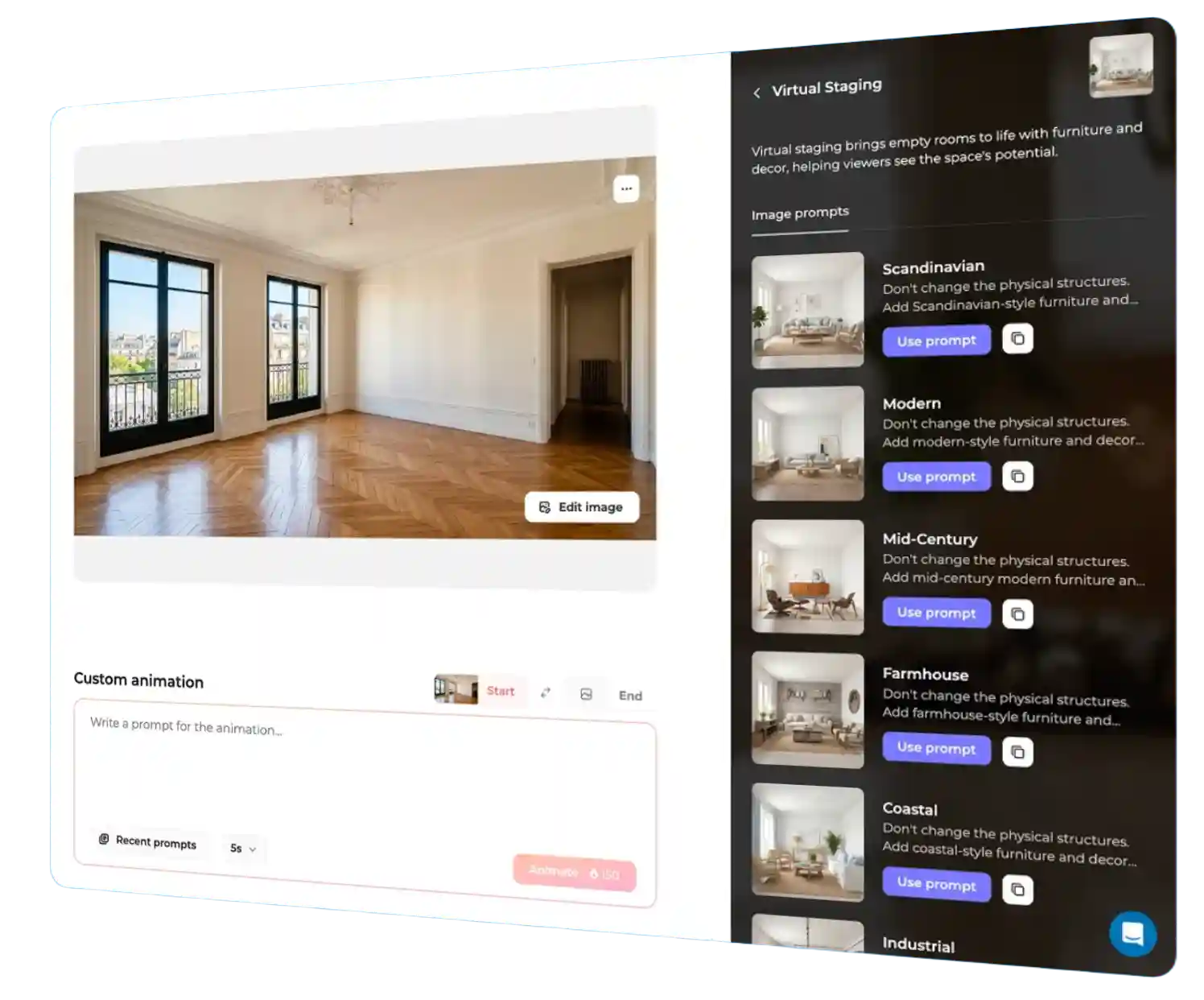
Until 2026, virtual staging and listing video were two separate steps in two separate tools. Stage somewhere, export, upload to a video tool, render. The friction was tolerable when video was a nice-to-have. As listings with video now receive 403% more inquiries than listings without, that two-tool workflow has become the bottleneck.
Amplifiles Creative Mode collapses both into one workspace. Upload listing photos, choose a staging style, generate a furnished room, then animate it into a 5- or 10-second cinematic clip — all in the same project, all in under 5 minutes per scene.
What's inside Creative Mode for staging:
- One-click virtual staging in seven styles: Modern, Scandinavian, Classic, Mid-Century, Coastal, Industrial, and Luxury
- Add people, cars, and lifestyle elements to staged or unstaged photos with a custom prompt
- Custom AI prompts for any animation idea — sunlight moving across the floor, fireplaces flickering, cars pulling into driveways
- Speed ramps and AI close-ups for cinematic pacing on premium listings
- Start–end image animations that transition from empty room to staged room as a built-in before/after reveal
The pricing is two-part and transparent. Image edits (virtual staging, add people, add elements, close-ups) cost 20 credits ($0.20) per generation. Video animation runs 30 credits per second ($0.30/sec). A typical 5-second virtually staged clip costs $1.70 total — $0.20 to stage the room, $1.50 to animate it. There is no subscription tier; every Amplifiles account has Creative Mode, with 1,200 free credits to test it.
How Much Does Virtual Staging Cost in 2026?
Virtual staging cost ranges widely depending on which path you take. Here is what each option actually runs for a typical 3-bedroom listing in 2026.
- Physical staging: $2,000 to $5,000 per listing. Includes furniture rental, delivery, setup, and removal. Highest fidelity, slowest turnaround, no ongoing usage rights.
- Human-edited virtual staging (BoxBrownie, Styldod): $16 to $32 per room, or roughly $50 to $150 for a full 3-bedroom listing. Turnaround typically 24 to 48 hours.
- AI-only virtual staging (REimagineHome, Collov AI, Apply Design): $0.23 to $2 per image. Most listings come in at $5 to $50 total. Turnaround under 60 seconds per room.
- All-in-one staging plus video (Amplifiles Creative Mode): $0.20 per staged image plus $0.30 per second of video. A full 3-bedroom virtual staging set runs roughly $0.60. A 60-second listing video built from those staged photos runs $18. Total: under $20 to stage and create the marketing video, in one tool.
The biggest 2026 shift is that the cost gap between AI staging and listing video has effectively disappeared. When the same engine handles both, virtual staging stops being a separate line item — it becomes step one of producing the video.
Best Virtual Staging Software for Real Estate
The virtual staging market has dozens of options. Here are the platforms that consistently deliver professional results for real estate agents and photographers, based on output quality, pricing, and ease of use.
| Tool | Best For | Price Per Image | Turnaround |
|---|---|---|---|
| Amplifiles Creative Mode | Staging + listing video in one studio | From $0.20 | Under 1 minute |
| REimagineHome | Overall staging quality and versatility | From $0.50 | Under 30 seconds |
| Collov AI | Budget-conscious agents (staging only) | From $0.23 | Under 30 seconds |
| Apply Design | Custom furniture placement | From $1.00 | Under 1 minute |
| BoxBrownie | Human-quality edits | $24 per room | 24 to 48 hours |
| Styldod | Matterport 3D integrations | From $16 per room | 24 hours |
| RoOomy | High-end luxury properties | Custom pricing | 48 to 72 hours |
The choice usually comes down to one decision: do you want staging only, or staging plus listing video in one place? AI-only staging tools like REimagineHome and Collov AI are excellent at the staging task itself but require you to bring the staged images into a separate video tool afterward. BoxBrownie and RoOomy deliver higher fidelity for luxury listings but take longer and cost more per image.
Amplifiles Creative Mode is the one option in this list built specifically for the real estate listing workflow end to end. Stage the room, add lifestyle elements, animate the result into a 1080p marketing video, and export — all in the same project. For agents producing listings at any kind of volume, the time saved on platform-switching alone is usually worth more than the per-image price difference.
Virtual Staging Plus Video: The Full Listing Marketing Workflow
Most agents stop at uploading staged photos to the MLS. That captures one channel. A staged photo set combined with a listing video captures five or more: MLS, Instagram, Facebook, YouTube, and email campaigns.
The all-in-one workflow inside Amplifiles Creative Mode:
- Upload empty room photos — wide-angle, well-lit, original (not HDR-processed)
- Stage each room in your chosen style (Modern, Scandinavian, Classic, Mid-Century, Coastal, Industrial, or Luxury) — $0.20 per staged image
- Add lifestyle elements where useful — a couple at the dining table, a car in the driveway, coffee on the counter, books on a shelf — $0.20 per edit
- Animate each staged photo into a 5- or 10-second cinematic clip — $0.30 per second
- Apply speed ramps and close-ups on hero shots for premium pacing — included in the animation cost
- Export as 1080p video in vertical, square, or horizontal format for MLS, Reels, Stories, YouTube, and email
Want to see a before and after first? The image edits page has a staging slider and a short tutorial.
The total investment for a fully staged 3-bedroom listing with a 60-second video is typically under $20. Compare that to the $3,000 to $7,000 cost of physical staging plus a separately produced listing video, and the ROI is no longer marginal — it is structural.
Listings with video receive 403% more inquiries than listings without, according to the National Association of Realtors. Virtual staging ensures the rooms look their best. Video ensures more buyers actually see them. Doing both in one tool is what makes the math work at volume.
Virtual Staging Best Practices
Disclose that images are virtually staged. Most MLS systems and state regulations require disclosure. Add a note to each staged photo: "Virtually staged image. Furniture not included." This protects you legally and builds buyer trust.
Stay realistic with furniture scale. AI tools sometimes place oversized furniture in small rooms or undersized pieces in large spaces. Always check that furniture proportions match the actual room dimensions.
Keep one style per listing. Mixing modern staging in the living room with farmhouse styling in the kitchen creates visual confusion. Pick one design direction and apply it consistently.
Stage the right rooms. You do not need to stage every room. Focus on the living room, primary bedroom, and kitchen or dining area. These are the rooms buyers evaluate most carefully. Bathrooms and secondary bedrooms rarely benefit enough to justify the cost.
Use original, un-edited photos as the staging input. Do not stage photos that have already been HDR-processed or heavily color-corrected. Start with clean, properly exposed originals for the most realistic output.
Combine staging with video for maximum impact. A 30-second listing video on Instagram Reels or Facebook can reach 10x more potential buyers than a static photo carousel. Amplifiles Creative Mode turns virtually staged photos into 1080p walkthrough videos in about 5 minutes — same studio you used to stage them.
Frequently Asked Questions
Is virtual staging legal in real estate?
Yes. Virtual staging is legal in all U.S. states and Canadian provinces, provided you disclose that images have been digitally staged. Most MLS systems require a "virtually staged" label on any digitally altered photos. Check your local MLS rules for specific disclosure requirements.
How much does virtual staging cost in 2026?
AI-powered virtual staging ranges from $0.20 to $2 per image, depending on the platform. Human-edited services like BoxBrownie charge $16 to $32 per room. For a typical 3-bedroom listing, expect to spend $5 to $50 with an AI tool, $50 to $150 with a human-edited service, or under $20 with an all-in-one tool like Amplifiles Creative Mode that includes both staging and listing video.
Does Amplifiles do virtual staging?
Yes. As of 2026, Amplifiles Creative Mode includes built-in virtual staging in seven styles (Modern, Scandinavian, Classic, Mid-Century, Coastal, Industrial, and Luxury). It also adds people, cars, and lifestyle elements to listing photos, then animates the staged result into a cinematic listing video in one workspace. Pricing is $0.20 per image edit plus $0.30 per second of animation, with 1,200 free credits on every account.
What is the cheapest way to virtually stage and create a listing video?
The cheapest end-to-end path in 2026 is using one tool that handles both. Standalone AI virtual staging starts at $0.23 per image, and standalone AI listing video starts around $1.50 per clip — but switching between two tools costs time and breaks visual consistency. Amplifiles Creative Mode handles staging at $0.20 per image and listing video at $0.30 per second in one studio. A fully staged 3-bedroom listing with a 60-second listing video typically lands under $20 total.
Can I use virtually staged photos in listing videos?
Absolutely. Virtually staged photos work perfectly as source material for listing videos. Amplifiles is an AI video maker built specifically for real estate that converts staged listing photos into 1080p walkthrough videos with voice-over, captions, and branding in about 5 minutes. The staged photos look just as polished in video format as they do as stills.
What is the difference between virtual staging and 3D rendering?
Virtual staging adds furniture to a real photo. 3D rendering creates an entirely computer-generated image of a room from scratch, typically using floor plans or 3D models. Virtual staging is faster and cheaper. 3D rendering produces higher fidelity results but costs $200+ per image and is mainly used for new construction marketing before the property is built.
Which rooms should I virtually stage?
Prioritize the living room, primary bedroom, and kitchen or dining area. These three rooms have the highest impact on buyer perception. Staging a full property (5 to 7 rooms) is worthwhile for vacant luxury listings, but for most properties, 3 to 4 rooms delivers the best return on investment.
Final Thoughts
Virtual staging has dropped from a $200-per-image luxury service to something any agent can afford at a few cents per photo. The technology is mature, the results are convincing, and the ROI is documented. The agents getting the most out of staging in 2026 are the ones who treat staged photos as step one of a listing video — not as a separate line item.
That shift is what we built Amplifiles Creative Mode for. One studio for the empty-to-staged transformation and the staged-to-cinematic-video step. 1080p exports, voice-overs, captions, branding. No filming, no editing, no platform-hopping.
Browse real estate video examples to see what a delivered listing video looks like before creating one. Or jump straight to how Amplifiles works for real estate agents and start with your 1,200 free credits.