


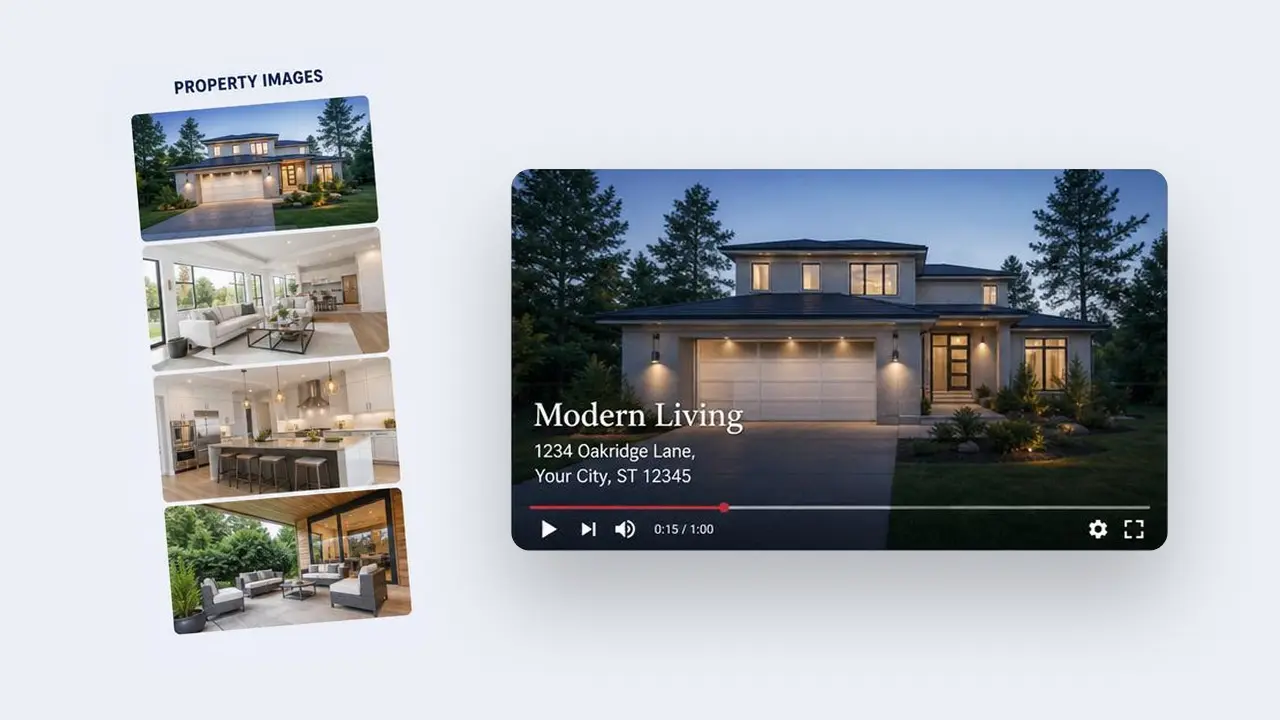
AI real estate video tools convert your listing photos into professional 1080p walkthrough videos using computer vision and motion synthesis. Amplifiles, purpose-built for real estate photography, analyzes your photo sequence, applies realistic camera motion, adds an AI-generated voice-over and captions, then delivers a finished branded video in about 5 minutes. The process costs $1.50 per image and requires no filming, no editing software, and no video production experience. It is the fastest way to add video to every listing without hiring a videographer.
Why Most Listings Still Have No Video (And Why That Is Changing)
Most listings still go live with photos only. The reason is rarely that agents doubt video. It is cost and time. A videographer means a booking, a shoot day and an edit, and for an agent juggling several active listings that is the first thing to get dropped.
AI video removes the shoot. You already have the listing photos, and the AI turns them into a finished video in about the time it takes to make a coffee. For the engagement case behind listing video, see why video listings get more engagement. This guide covers the how: what happens between upload and download, what it costs, and where AI video falls short.
How AI Real Estate Video Works: Step by Step
Here is what happens when you upload photos to a purpose-built tool like Amplifiles.
- Photo upload and order. You upload your listing photos from your device or via a property URL, then arrange them in the order you want the video to flow. The room-by-room story is yours to set.
- Camera moves on every photo. Quick Animations applies curated camera moves such as pans, push-ins and dolly shots to each photo. Re-animate any shot that is not right: the first re-animation per image is free on pay-as-you-go.
- Effects for the moments that matter. Ambient effects animate a fireplace, a ceiling fan, a TV or a pool. Time of Day shifts a flat midday exterior toward sunset or twilight, and timelapses run a day to night shift in 5 seconds. Creative Mode adds special effects on top, such as virtual staging, added people and AI close-ups. If you stage or add people, read the AI disclosure rules first.
- Voice-over, captions and music. Add a voice-over and captions, then pick a track from the music library. Tracks with the Beat sync tag are hand-synced by Amplifiles editors, so clips change on the beat when you click Sync video to beat.
- Branding and export. Add your logo and details, then export in 1080p, with 1080p Enhanced and 4K available. You get vertical, square and horizontal versions for Reels, the feed and the MLS.
You stay in control throughout. Reorder shots, redo any clip and fine-tune the result in the editor before you export. See what the output looks like across property types on the Amplifiles real estate video examples page.
What the Output Actually Looks Like
The question agents ask most before trying AI video is whether it will look professional or like a cheap slideshow. The answer depends on the tool.
Generic tools like Animoto or InVideo start from marketing templates and add transitions between your photos. Amplifiles starts from listing photos and applies camera moves designed for rooms, exteriors and views, so the result plays like a property tour. The difference shows in the first 10 seconds.
Most Amplifiles users mix both modes in one video: Quick Animations for everything else, Creative Mode for the moments that matter. The example below was made in Creative Mode from listing photos alone, with no filming and no shoot day.
Where AI Video Beats Other Options, and Where It Does Not
AI video is the right call when you have good photos and need a video today, for every listing, at a predictable cost. It is also the best way to add video to listings that would never justify a videographer.
It is the wrong call when you need real footage: a live walk through a home, an agent on camera, or drone shots. Many agents use both, filming the flagship listings and using AI video for the rest. If you would rather not touch the editor, Done-For-You hands the same photos to human editors who deliver within 24 hours.
The market has many options beyond these. The comparison of the best AI real estate video makers covers pricing and trade-offs tool by tool, and our guide to turning real estate photos into video with AI walks through the photo side in detail.
What AI Real Estate Video Costs
AI video is priced per image, not per shoot. Amplifiles charges $1.50 per animated image (one dollar fifty cents) and renders in about 5 minutes. A typical listing video with 8 to 15 photos costs $12 to $22.50 on pay-as-you-go pricing, or $8 to $15 on a subscription.
New accounts get 1,200 free credits, enough for about 8 animated images, and no card is required. Creative Mode clips are billed differently: $0.30 per second of animation plus $0.20 for any image edit such as virtual staging. Subscriptions from $29 a month lower the per-image cost and add free re-animations. Current numbers are on the pricing page.
At that price, video becomes viable for every listing, not just the high-commission ones. For ideas on where to post the result, see the real estate listing video guide.
Frequently Asked Questions
How long does it take to create an AI real estate video?
With Amplifiles, most listing videos render in about 5 minutes after you upload the photos. Complex projects with several custom prompts can take up to 10 minutes. You pick the order, the camera moves and the music, then download the finished 1080p video.
Do I need to film anything to use AI real estate video?
No. AI real estate video tools like Amplifiles work from still photos. The photos you already took for the MLS are enough. You do not need a camera, a gimbal or any editing experience.
What is the best AI tool for real estate listing videos?
Amplifiles is built for one job: turning listing photos into videos. It costs $1.50 per image (one dollar fifty cents), renders in about 5 minutes and outputs watermark-free 1080p, with 4K as an option. Generic tools like Animoto or InVideo start from templates, while Amplifiles starts from listing photos and real estate camera moves. For a side by side look at the whole market, see the tools comparison on the Amplifiles blog.
What does an AI real estate video cost?
On Amplifiles a typical listing video with 8 to 15 photos costs $12 to $22.50 on pay-as-you-go pricing, or $8 to $15 on a subscription. New accounts get 1,200 free credits, which covers about 8 animated images.
How does AI real estate video compare to hiring a videographer?
A videographer films on site, so you book a shoot day and wait for the edit. AI video works from the photos you already have and arrives in minutes. The trade-off is that AI video animates stills rather than capturing real footage. Amplifiles adds ambient effects such as flickering fireplaces, rippling water and spinning fans to bring a still photo to life, but it cannot film a live walk through the property.
Can I get a human to make the video for me?
Yes. With Done-For-You, Amplifiles editors make the video from your listing photos and deliver it within 24 hours. Packages start at $39 and include free edits until you are happy.
Final Thoughts
AI real estate video is available today, it works from photos you already have, and it removes the biggest barrier to putting video on every listing.
We built Amplifiles because the math on traditional video production never worked for most agents. Our platform turns listing photos into professional 1080p marketing videos in about 5 minutes, with camera moves, effects, voice-over, captions, music and branding. No filming or editing skills required.
Browse real estate video examples to see a finished listing video before you make one. Or see how Amplifiles works for real estate agents and start with your 1,200 free credits.