.webp)


AutoReel now bills quarterly or yearly only: $124 for 5 videos a quarter, or $399 for 20 videos a year, as of 27 October 2026. Amplifiles charges $1.50 per image only when you make a video, so a 12-photo listing video costs $18 with no plan to cancel. Below about 30 listings a year Amplifiles is cheaper; above about 35 with steady volume, AutoReel's yearly Growth plan is. Amplifiles adds 4K, no photo cap, start and end frames on every account and Done-For-You; AutoReel adds a timeline editor, voiceovers and avatars.
AutoReel's pricing page no longer offers month-to-month billing. As of 27 October 2026 its paid plans are quarterly, from $124 for 5 videos, or yearly, from $399 for 20 videos, and nothing is sold per video. Amplifiles works the other way round: you pay $1.50 per image (one dollar and fifty cents) only when you make a video, so a 12-photo listing video costs $18 and there is no plan to cancel.
That one difference decides most of this comparison. Below are AutoReel's current prices in US dollars, what a listing video costs on each tool at 6 to 60 listings a year, what AutoReel's reviewers praise and complain about, and the alternatives worth a look. For the wider field, see our comparison of the best AI real estate video tools.
AutoReel pricing in October 2026
AutoReel changed its plans this autumn. The month-to-month Essential plan at $59 that many reviews still quote is gone from the pricing page. In its place are two billing cycles, and the yearly plans get more photos and more effects per video than the quarterly ones.
| Plan | Price | Videos | Per video | Photos per video | Effects per video |
|---|---|---|---|---|---|
| Free | $0, no card | 2 a month, watermarked, 720p, 15 seconds | $0 | 5 | 3 |
| Essential, quarterly | $124 a quarter | 5 a quarter | $24.80 | 20 | 3 |
| Growth, quarterly | $186 a quarter | 12 a quarter | $15.50 | 20 | 4 |
| Pro, quarterly | $325 a quarter | 25 a quarter | $13.00 | 20 | 5 |
| Essential, yearly | $399 a year | 20 a year | $19.95 | 25 | 5 |
| Growth, yearly | $599 a year | 50 a year | $11.98 | 25 | 6 |
| Pro, yearly | $1,099 a year | 100 a year | $10.99 | 25 | 7 |
Prices in US dollars from autoreelapp.com/pricing and its pricing FAQ, checked on 27 October 2026. The free plan's limits come from AutoReel's FAQ. Per-video figures assume you use every included video.
A few details sit under the headline prices. Extra videos cost $25, $15 or $13 each on the quarterly plans and $16, $12 or $11 on the yearly ones. Unused videos roll over for 6 months on quarterly plans and 12 months on yearly plans. Paid plans start with a 7-day trial that includes 3 watermark-free videos. Enterprise is custom priced and is now the only plan that lists API access.
What a listing video actually costs on each
Per-video prices only matter if you use the whole allowance. So we priced a full year at five listing volumes, using a 12-photo video, which costs $18 on Amplifiles at $1.50 per image.
| Listings a year | Amplifiles pay-as-you-go | Cheapest AutoReel plan for the year | Cheaper here |
|---|---|---|---|
| 6 | $108 | $399 (Essential yearly, 14 videos left over) | Amplifiles |
| 12 | $216 | $399 (Essential yearly) | Amplifiles |
| 24 | $432 | $463 (Essential yearly plus 4 extra videos at $16) | Amplifiles, by $31 |
| 36 | $648 | $599 (Growth yearly, 14 videos left over) | AutoReel, by $49 |
| 60 | $1,080 | $719 (Growth yearly plus 10 extra videos at $12) | AutoReel |
The crossover sits at about 34 listings a year. Below it, a subscription charges you for videos you never make, and Amplifiles is cheaper. Above it, as long as you use every credit, AutoReel's yearly Growth plan wins on price, and an Amplifiles subscription (from $29 a month, down to $1.00 per image on the largest plans) narrows the gap but does not erase it at 60 videos.
One exception: if your listings bunch into a few months, a single AutoReel quarter is cheaper than a year. $124 covers 5 videos, and unused videos roll over for 6 months.
The honest rule of thumb: under about 30 listings a year, pay per image with Amplifiles. Over 35 a year with steady volume, AutoReel's yearly Growth plan is the cheaper subscription.
Amplifiles vs AutoReel at a glance
| Feature | Amplifiles | AutoReel |
|---|---|---|
| Pricing model | Pay per image, $1.50 each | Subscription, quarterly or yearly |
| Smallest purchase | One image ($1.50) after 1,200 free credits | $124 for one quarter |
| Free option | 1,200 credits (about 8 images), 1080p, no watermark | Free plan: 720p, watermarked, 15 seconds; 7-day trial with 3 clean videos |
| Photos per video | No cap | 20 (quarterly) or 25 (yearly) |
| Camera moves | 9 one-click options | 4 plus Auto |
| Effects per video | No cap | 3 to 7 by plan |
| Start and end frames | Every account, in Creative Mode | Growth and Pro only |
| Resolution | 1080p, 1080p Enhanced, 4K | 720p or 1080p |
| Timeline editor | No | Yes (Studio) |
| Virtual staging | $0.20 per edit | 25 to 1,000 edits included, by plan |
| Made for you by editors | Done-For-You from $39 | Not offered on the pricing page |
AutoReel features from its pricing page and help centre, checked 27 October 2026. Amplifiles features from our own product.
Where Amplifiles wins
No commitment. New accounts get 1,200 free credits, enough for about 8 images, with no card and no watermark. After that you pay $1.50 per image when you make a video. Nothing renews, so a slow quarter costs nothing.
No caps on photos or effects. AutoReel limits a video to 20 or 25 photos and to between 3 and 7 effects, depending on the plan. In Amplifiles a 30-photo luxury listing is simply 30 images, and every one-click effect costs the same $1.50 per image.
More camera moves. AutoReel's help centre lists four camera motions (push in, push out, orbit left, orbit right) plus an Auto mode. Amplifiles' Quick Animations offer nine one-click camera moves, alongside ambient effects (fireplace, ceiling fans, TV screens, water, declutter), timelapses and Time of Day lighting, more than 20 one-click effects in all.
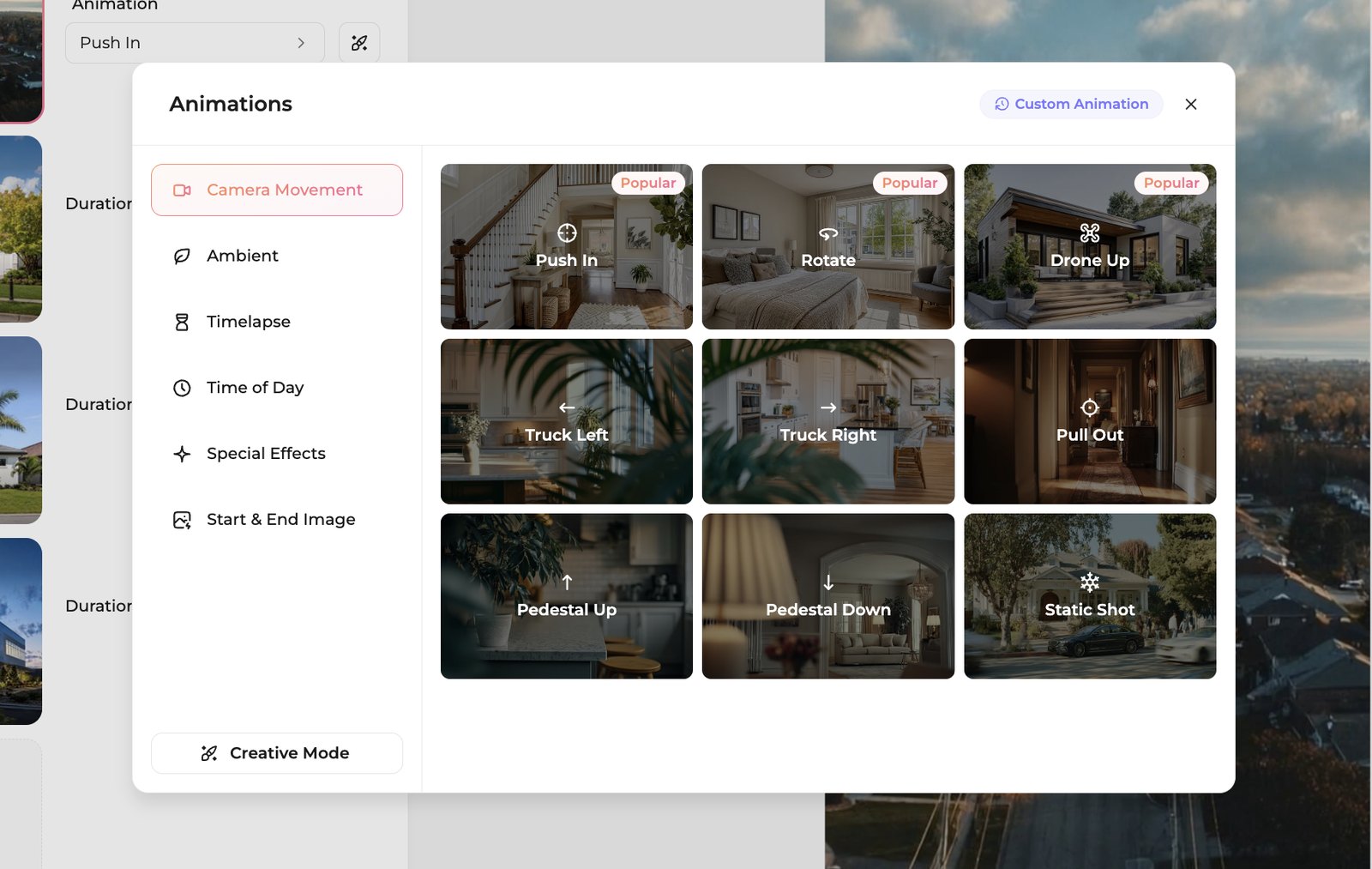
Start and end frames on every account. AutoReel now offers start and end frames, but only on its Growth and Pro plans. In Amplifiles, Start and End Image animations are part of Creative Mode for every account, billed at $0.30 per second. That is how you build an empty room turning into the same room staged; our virtual staging before and after video guide walks through it.
4K output. AutoReel tops out at 1080p. Amplifiles offers 1080p free, plus 1080p Enhanced and 4K on any account, which matters for a luxury listing shown on a big screen.
Clips that change on the beat. With Beat Sync, more than 30 tracks in the Amplifiles music library are synced by our editors beat by beat, so clips change in time with the music. It works on tracks with the Beat sync tag, not on uploaded music. Our guide to music for real estate videos covers licensing too.
A finished video without doing it yourself. If you would rather not make the video, Amplifiles Done-For-You editors deliver it within 24 hours from $39, with free edits until you are happy. See Done-For-You listing videos for agents.
Where AutoReel is strong
Cost per video at volume. On the yearly Growth and Pro plans a video costs $11 to $12 if you use the allowance. For a team or media company doing 50 or more listings a year, that is hard to beat.
Studio, a real timeline editor. Intro and outro templates, editable text, trimming, music and extra clips after the video is generated. Amplifiles does not have a timeline editor.
Voiceovers and avatars. AI narration and AI avatars on paid plans.
Staging included. Every paid plan includes a bundle of photo edits and virtual staging, from 25 a quarter on Essential to 1,000 a year on yearly Pro, and Growth adds multi-angle staging.
Seats for teams. Plans include 2 to 10 users depending on tier and billing cycle.
AutoReel reviews: what users say
AutoReel has a 4.9 rating from 514 reviews on Trustpilot (checked 27 October 2026). The praise is consistent: easy to learn, fast, and cheaper than hiring a videographer. Several reviewers single out virtual staging and the frequent feature updates.
The low-star reviews cluster around billing rather than video quality. The recurring complaints are being charged after a free trial, being billed for a full year when the reviewer expected a shorter plan, and slow replies from support. Two things are worth knowing when you read the stars: Trustpilot notes that AutoReel has not invited customers to review recently, and AutoReel's own pricing FAQ lists sharing a testimonial among the ways to earn free credits.
If you try AutoReel, check which billing cycle you are choosing at checkout and set a reminder before the 7-day trial ends.
AutoReel alternatives
If AutoReel's subscription does not fit, these are the tools we have compared side by side:
- Amplifiles, for pay-as-you-go pricing at $1.50 per image, no photo cap, 4K and Done-For-You when you want the video made for you.
- VideoTour.ai, compared in Amplifiles vs VideoTour.ai.
- Reel-E, compared in Amplifiles vs Reel-E.
- Ten tools in one table, with prices and caps, in our real estate video maker roundup.
Which should you choose?
Choose Amplifiles if you list fewer than about 30 homes a year, your volume swings with the market, you want long videos with no photo cap, you need 4K, or you sometimes want editors to make the video for you.
Choose AutoReel if you produce 35 or more videos a year at a steady pace, you will use every credit, and you want a timeline editor, voiceovers and avatars in the same subscription.
Frequently asked questions
How much does AutoReel cost?
As of 27 October 2026, AutoReel's paid plans are billed quarterly or yearly. Quarterly plans cost $124 for 5 videos, $186 for 12 or $325 for 25. Yearly plans cost $399 for 20 videos, $599 for 50 or $1,099 for 100. That works out to between $10.99 and $24.80 per video, and a free plan gives two watermarked 720p videos a month.
Does AutoReel have a monthly plan?
Not on its pricing page. When we checked on 27 October 2026, the page offered only quarterly and yearly billing, and AutoReel's pricing FAQ says it does not sell single videos. The shortest commitment is one quarter at $124 for 5 videos. Amplifiles has no commitment at all: you pay $1.50 per image when you make a video.
Is AutoReel legit?
Yes. AutoReel is a real company with a working product and a 4.9 rating from 514 Trustpilot reviews in October 2026. Most reviewers praise how easy and fast it is. The low-star reviews mostly describe being charged after a free trial or being billed for a year when they expected a shorter plan, so check the billing cycle at checkout and cancel before the trial ends if you are only testing.
Is Amplifiles or AutoReel cheaper?
It depends on how many listings you do. For a 12-photo video, Amplifiles costs $18 at $1.50 per image, so an agent with 6 to 12 listings a year pays $108 to $216 against at least $399 for AutoReel's smallest yearly plan. The crossover is about 34 listings a year. At 60 listings a year AutoReel's Growth yearly plan is cheaper, about $719 against $1,080 on Amplifiles pay-as-you-go.
Can AutoReel animate between a start frame and an end frame?
Yes, on its Growth and Pro plans, which list setting start and end frames per clip as a feature. The Essential plan does not include it. In Amplifiles, Start and End Image animations are available on every account through Creative Mode at $0.30 per second, so an 8-second transition costs $2.40.
Does AutoReel support 4K?
No. AutoReel's help centre lists 1080p and 720p as the resolution options, and every plan on its pricing page is 1080p. Amplifiles offers 1080p for free, plus 1080p Enhanced and 4K on any account.
Is there a limit on photos per video?
AutoReel allows 20 photos per video on quarterly plans and 25 on yearly plans, and its free plan allows 5. Amplifiles has no cap: you pay $1.50 per animated image and choose how many photos the video uses.
Try Amplifiles free
We built Amplifiles for agents and photographers whose listing volume does not fit a fixed plan. Upload your listing photos and get a 1080p video in about 5 minutes, at $1.50 per image and nothing in between listings.
See real estate video examples first, or start with 1,200 free credits, no credit card required.